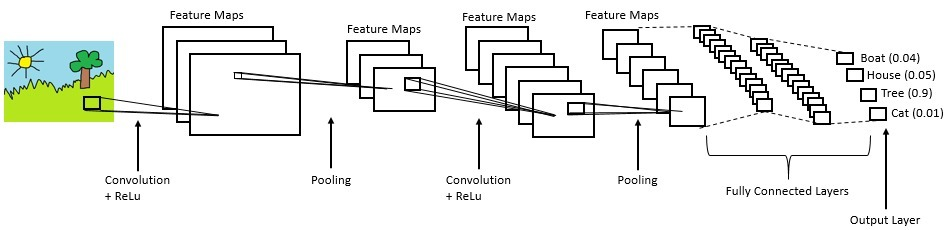
Convolutional Neural Network: Convolutional Neural Network: As we all are aware of the fact, how deep learning and transfer learning is revolutionizing the world with its immense capability of handling any kind of data and learning so efficiently. So, similarly we have applied the same concept by picking a deep learning model i.e., Convolutional neural network which basically work son the principle of having filters. Each convolutional layer has some specific filters to identify and extract the features from the input image and learn it and transfer it to other layers for further processing. We can have as many filters as possible in the convolutional layer depending on the data we are dealing on. Filter are nothing but feature detectors in the input data. Along with the convolutional layer we also have other layers which does further pre-processing such as Maxpooling, Activation function, Batch Normalization and dropout layer. These all contribute to the CNN model creation and along with the flatten and output layer. The reason we do flattening is to feed the output of the CNN model to the dense layer which gives us the probability of the predicted value.
References:
https://www.ibm.com/cloud/learn/convolutional-neural-networks
Long Term Short Memory: If you want to predict the next word for the sentence “I like numbers, my favourite subject is …” your answer would be “mathematics”. How do you come to that conclusion; it is because of the word “numbers”? Recurrent Neural Networks help us achieve this. They are neural networks with loops, allowing the information to stay for some time.
Figure 1: Recurrent Neural Network
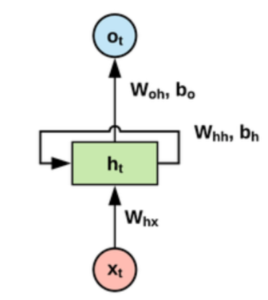
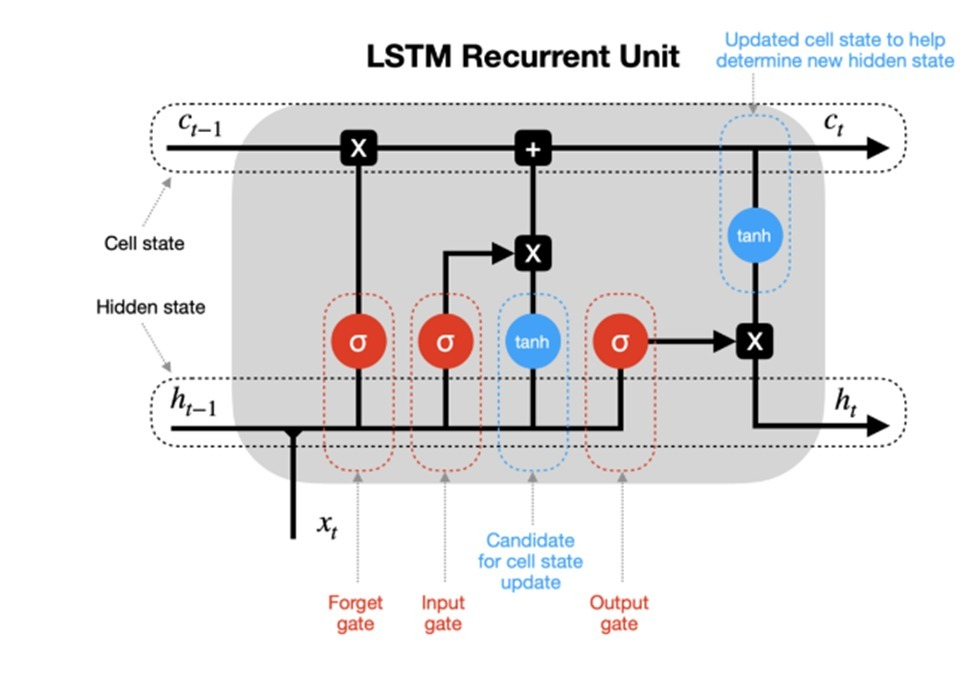
Xt is the input, the Network analyses and throws out output ht. RNNs have performed decently but the problem comes when the sentence is too long and has immense data. E.g., predict the next word for the sentence “I like numbers, my favourite subject is mathematics. My brother likes space and technology, his favourite subject is ….” your answer would be “astronomy”. How do you come to that conclusion, it is because of the word “space and technology”? But how does the network know that word mathematics is not important now and “space and technology is important now”. Also, the problem with RNNs is it cannot remember the entire sequence for long. Long Short-Term Networks (LSTMs) are a special kind of RNN which are very much capable of handling long term dependencies. LSTMs has a cell state which holds the important word/information required for processing. The information in the cell state can be forgotten (removed) or added based on gates. It has 3 gates to help it decide:
- Forget gate:To forget the information in the cell state. Done with the help of a sigmoid function which returns a value between 0 and 1. If 1 or closer to 1, remove the word else retain the word.
- Input gate:What input should be given to the cell state done with the help of tan-h function.
- Update gate:Any information that can be added to the cell state. E.g. : When “space” was in cell state, update it with the word “technology” because word “technology” is important in decision making as well .
References:
Make sure you have checked the add to path tick boxes while installing python, anaconda.
Refer to this link, if you are just starting and want to know how to install anaconda.
If you already have anaconda and want to check on how to create anaconda environment, refer to this article set up jupyter notebook. You can skip the article if you have knowledge of installing anaconda, setting up environment and installing requirements.txt
- Install the prerequisites/software’s required to execute the code from reading the above blog which is provided in the link above.
- Press windows key and type in anaconda prompt a terminal opens up.
- Before executing the code, we need to create a specific environment which allows us to install the required libraries necessary for our project.
- Type conda create -name “env_name”, e.g.: conda create -name project_1
- Type conda activate “env_name, e.g.: conda activate project_1
- Go to the directory where your requirement.txt file is present.
- cd <>. E.g., If my file is in d drive, then
- d:
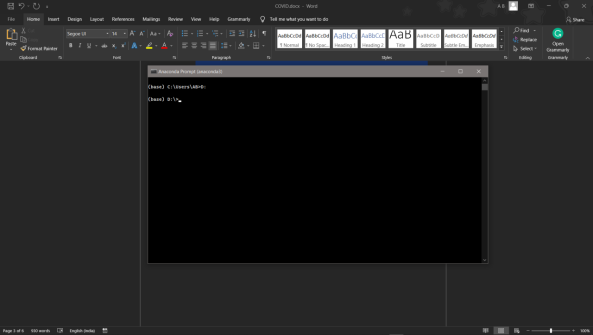
7.cd d:\License-Plate-Recognition–main #CHANGE PATH AS PER YOUR PROJECT, THIS IS JUST AN EXAMPLE
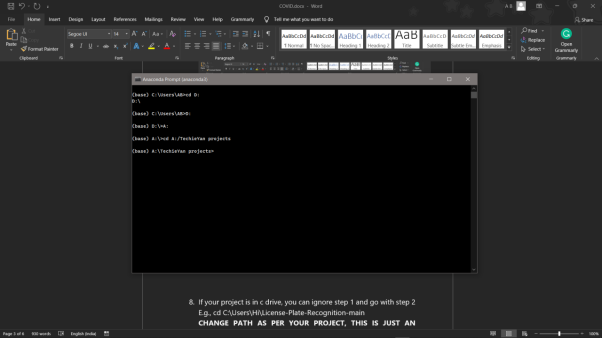
8. If your project is in c drive, you can ignore step 5 and go with step 6
9. g., cd C:\Users\Hi\License-Plate-Recognition-main
10. CHANGE PATH AS PER YOUR PROJECT, THIS IS JUST AN EXAMPLE
11. Run pip install -r requirements.txt or conda install requirements.txt (Requirements.txt is a text file consisting of all the necessary libraries required for executing this python file. If it gives any error while installing libraries, you might need to install them individually.)
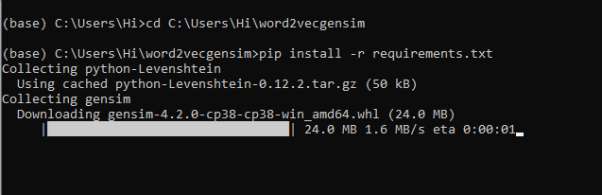
12. To run .py file make sure you are in the anaconda terminal with the anaconda path being set as your executable file/folder is being saved. Then type python main.pyin the terminal, before running open the main.py and make sure to change the path of the dataset.
13. If you would like to run .ipynb file, Please follow the link to setup and open jupyter notebook, You will be redirected to the local server there you can select which ever .ipynb file you’d like to run and click on it and execute each cell one by one by pressing shift+enter.
- Feel free to explore and train your own model, before that make sure you have followed this link on how to create anaconda environment and installing requirements.txt.
- After that, run python 1_clean.py, this will clean the dataset, like bringing down all the audio files to one scale.
- Run python 1_train.pyto train your own model, make sure to select only one model in the list of 3 models given in train.py.
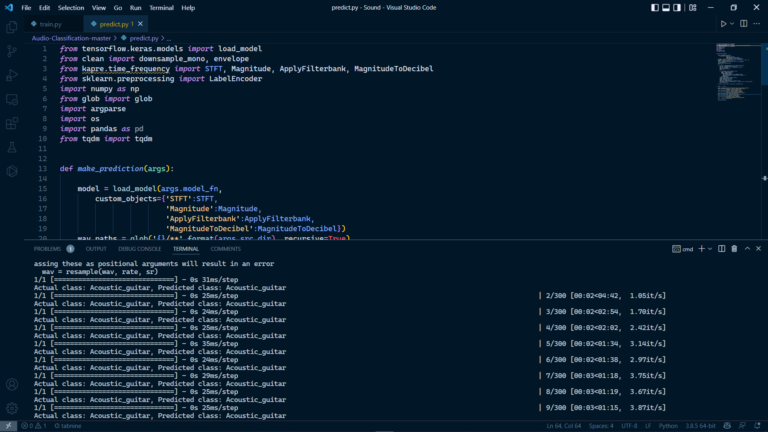
- After that, run python 1_predict.pyto make some predictions of and test whether the model is trained properly or not.
Please follow the above links on how to install and set up anaconda environment to execute files.
Please follow the above sequence if you would like to execute and the files require good system requirements to run.
Make sure to change the path of the dataset in the code
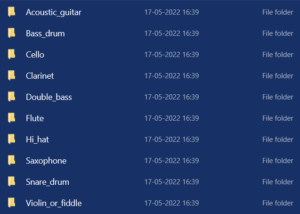
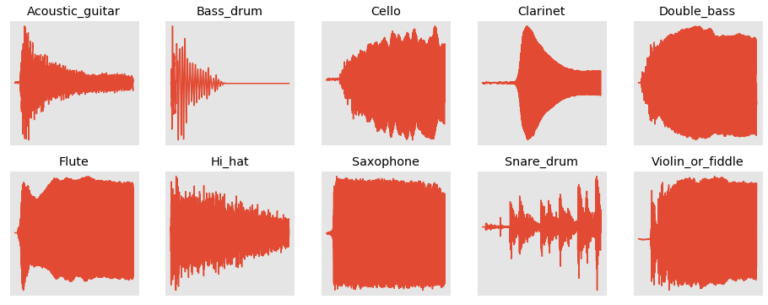
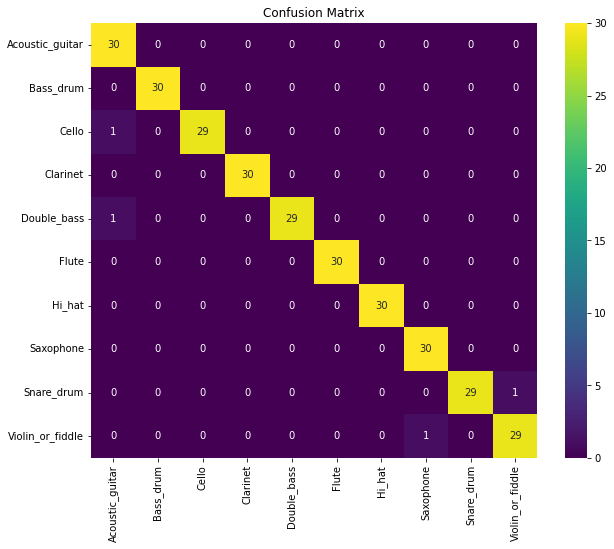
The Dataset was downloaded from a private data repository, which consists of around 10 different musical instruments each having 30 second duration 30 audio files. Given are the classes of musical instruments, Bass Drum, Cello, Hi_Hat, Flute, Saxophone, Snare_drum, Violin_or_fiddle.